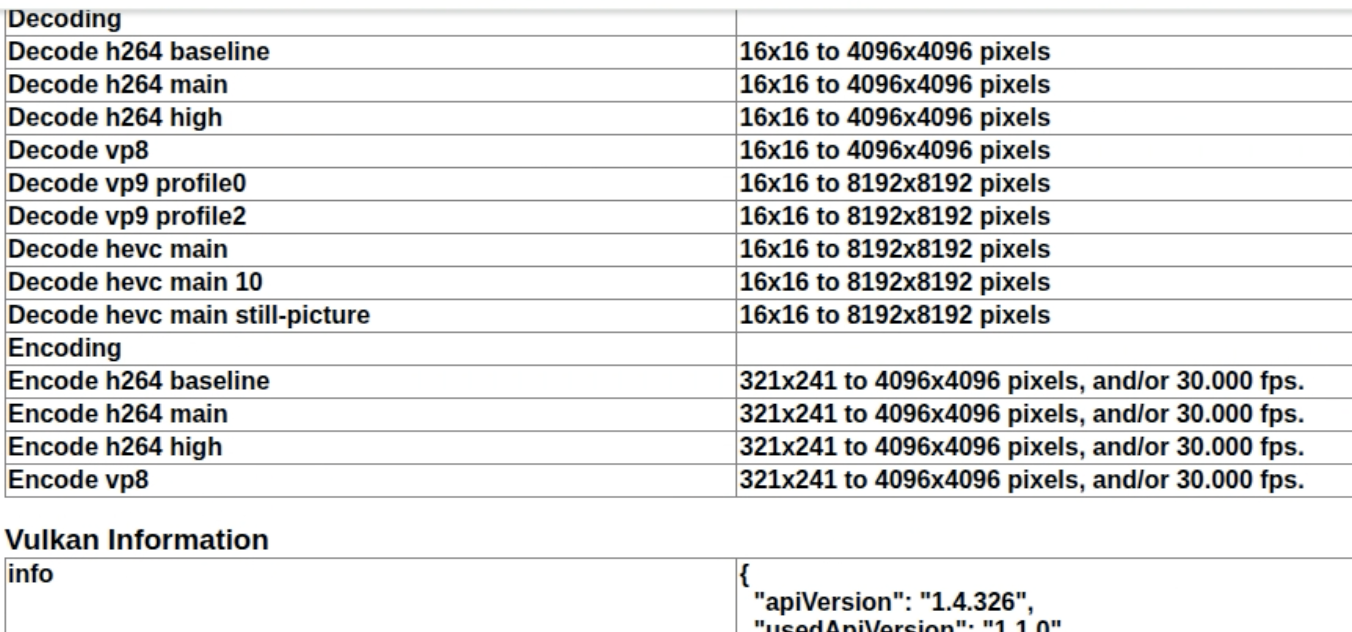

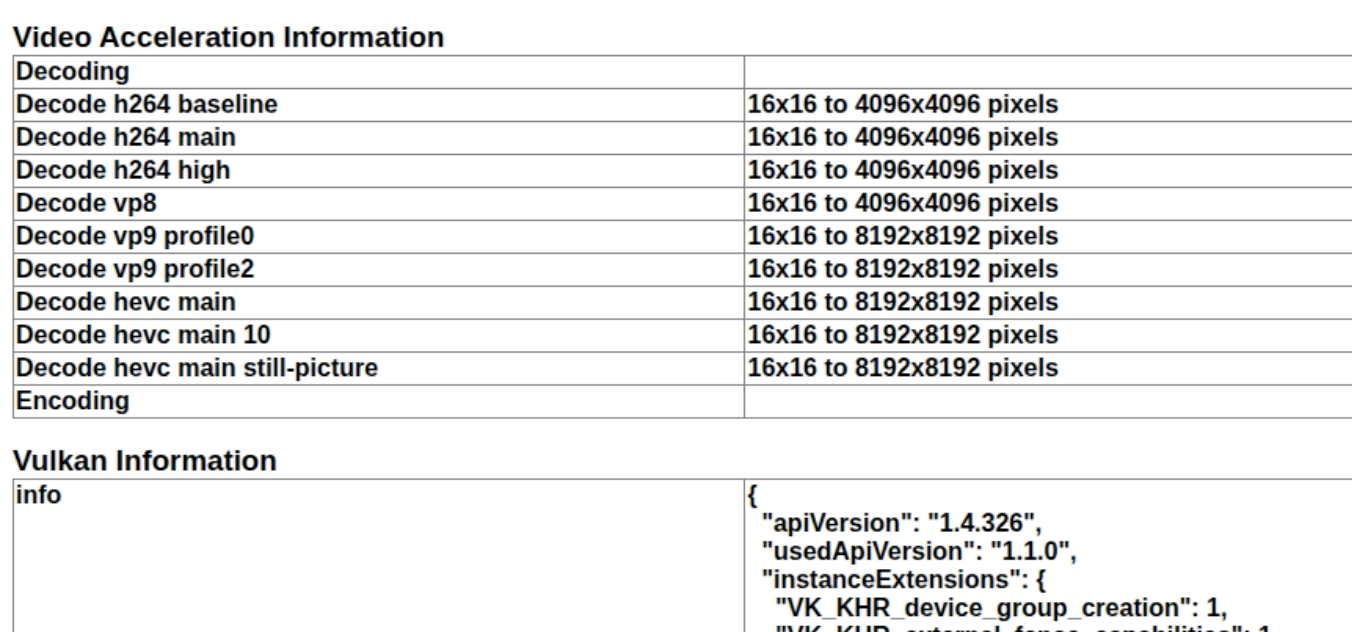
经过与ChatGPT反复探讨(挑战)与实机测试,目前官方Chrome对Linux平台的GPU硬件编解码支持度还是可以的,最新的141.0.7390不加任何启动参数启动,已经可以支持主流的H264,H265以及VP8,VP9的硬件解码:
image

带上启动参数:

1
google-chrome --enable-features=PlatformHEVCDecoderSupport,VaapiVideoDecoder,AcceleratedVideoEncoder,AcceleratedVideoDecodeLinuxGL,VaapiVideoEncoder,AcceleratedVideoDecodeLinuxZeroCopyGL

能够启用完整的VAAPI硬件编码:
image

而官方编译的Chromium由于版权问题,反而可能连基本的ffmpeg视频解码都成问题(特别是snapshot编译),除非是社区编译版本并且有明确说明启用了VAAPI支持或者打补丁的,例如:
https://github.com/StaZhu/enable-chromium-hevc-hardware-decoding
可以下载到:chromium 142.0.7427.0,实测也是支持硬件VAAPI编码和解码的。

本次测试实机环境是:

1
2
3
4
5
6
7
8
9
10
11
12
13
14
15
16
17
18
19
20
21
22
23
24
25
26
27
28
29
30
31
32
33
34
35
36
37
38
39
40
41
42
43
44
Intel(R) Core(TM) i5-8400
Ubuntu 24.04

#vainfo
libva info: VA-API version 1.22.0
libva info: User environment variable requested driver 'iHD'
libva info: Trying to open /usr/lib/x86_64-linux-gnu/dri/iHD_drv_video.so
libva info: Found init function __vaDriverInit_1_20
libva info: va_openDriver() returns 0
vainfo: VA-API version: 1.22 (libva 2.12.0)
vainfo: Driver version: Intel iHD driver for Intel(R) Gen Graphics - 24.1.0 ()
vainfo: Supported profile and entrypoints
VAProfileNone : VAEntrypointVideoProc
VAProfileNone : VAEntrypointStats
VAProfileMPEG2Simple : VAEntrypointVLD
VAProfileMPEG2Simple : VAEntrypointEncSlice
VAProfileMPEG2Main : VAEntrypointVLD
VAProfileMPEG2Main : VAEntrypointEncSlice
VAProfileH264Main : VAEntrypointVLD
VAProfileH264Main : VAEntrypointEncSlice
VAProfileH264Main : VAEntrypointFEI
VAProfileH264Main : VAEntrypointEncSliceLP
VAProfileH264High : VAEntrypointVLD
VAProfileH264High : VAEntrypointEncSlice
VAProfileH264High : VAEntrypointFEI
VAProfileH264High : VAEntrypointEncSliceLP
VAProfileVC1Simple : VAEntrypointVLD
VAProfileVC1Main : VAEntrypointVLD
VAProfileVC1Advanced : VAEntrypointVLD
VAProfileJPEGBaseline : VAEntrypointVLD
VAProfileJPEGBaseline : VAEntrypointEncPicture
VAProfileH264ConstrainedBaseline: VAEntrypointVLD
VAProfileH264ConstrainedBaseline: VAEntrypointEncSlice
VAProfileH264ConstrainedBaseline: VAEntrypointFEI
VAProfileH264ConstrainedBaseline: VAEntrypointEncSliceLP
VAProfileVP8Version0_3 : VAEntrypointVLD
VAProfileVP8Version0_3 : VAEntrypointEncSlice
VAProfileHEVCMain : VAEntrypointVLD
VAProfileHEVCMain : VAEntrypointEncSlice
VAProfileHEVCMain : VAEntrypointFEI
VAProfileHEVCMain10 : VAEntrypointVLD
VAProfileHEVCMain10 : VAEntrypointEncSlice
VAProfileVP9Profile0 : VAEntrypointVLD
VAProfileVP9Profile2 : VAEntrypointVLD

然后说回Electron,由于chromium这么多年在Linux平台上的毫无进展,导致官方一律关闭硬件支持(编码和解码都是纯CPU软编解,所谓的硬件加速仅仅是渲染加速),即使通过带参数运行启用了VAAPI加速也是虚假的信息,解决的办法只有一个——自己从源码编译(目前还没找到有社区提供预编译版本的,可能和FFMPEG没有预编译版本一样,版权怪兽影响的结果……)。
ChatGPT说能打补丁、或者嵌入一个官方预编译的Chromium二进制,只编译Electron的说法都是过时消息了,老老实实下载完整的包含node.js,chromium,electron和第三方依赖的完整120G源码、编译170G文件吧(记得用16G以上内存的机器,稳定的下载网络,否则下载进度和文件缓存分分钟清零给你看……)。

ChatGPT给出的编译说法也大多是过时和错误的,直接参数官方最新手册:
https://www.electronjs.org/zh/docs/latest/development/build-instructions-gn

一步都不要漏掉,然后在官方编译参数上加:

1
2
3
4
5
6
7
8
9
10
11
12
13
14
15
16
17
18
19
20
git clone https://chromium.googlesource.com/chromium/tools/depot_tools.git
export PATH=$PATH:~/depot_tools

gclient config --name "src/electron" --unmanaged https://github.com/electron/[email protected]

export DEPOT_TOOLS_UPDATE=0
gclient sync --with_branch_heads --with_tags

cd src
buildtools/linux64/gn gen out/Release --args='import("//electron/build/args/release.gn")
use_vaapi=true
use_ozone=true
ozone_platform="x11"
use_gtk=true
proprietary_codecs=true
ffmpeg_branding="Chrome"
rtc_use_h264 = true
enable_hevc_parser_and_hw_decoder = true'

ninja -C out/Release electron:electron_dist_zip

成功完成后,可以在out/Release目录下得到dist.zip即打包的electron linux x64版本能正常启用VAAPI编解码。